Choosing the right local storage solution is a critical decision for developers. It’s key for building fast and responsive mobile apps. The choice between traditional relational systems and newer alternatives is crucial for success.
Managing high-concurrency projects means your database’s architecture is key. It affects how fast and reliable your app is. Developers must consider the pros of old relational models and the speed of new object-oriented engines.
First, understand the trade-offs to optimize your app. By comparing SQLite vs ObjectBox, we see how they handle data under pressure. This helps you choose the right tool for your next challenge.
Key Takeaways
- Selecting a database requires balancing performance needs with architectural complexity.
- High-concurrency environments demand efficient data handling to maintain app responsiveness.
- Relational databases offer proven stability, while object-oriented alternatives prioritize speed.
- Understanding specific use cases helps developers avoid common performance bottlenecks.
- Strategic database selection is vital for long-term application scalability and reliability.
The Evolution of Local Data Storage
The move from centralized servers to edge computing has changed software design. In the past, apps needed constant internet to get data from a server. Now, with mobile-first development, apps keep data on the device.
The shift toward mobile-first and edge computing
Users want apps to work fast, no matter the internet. This need has made local data storage key for a good user experience. Edge computing lets apps work offline, keeping them fast.
This method cuts down on delays by not needing to go back to a cloud server. So, mobile-first development focuses on storing data locally. This makes apps run smoother and more reliably.

Why concurrency has become a bottleneck for legacy systems
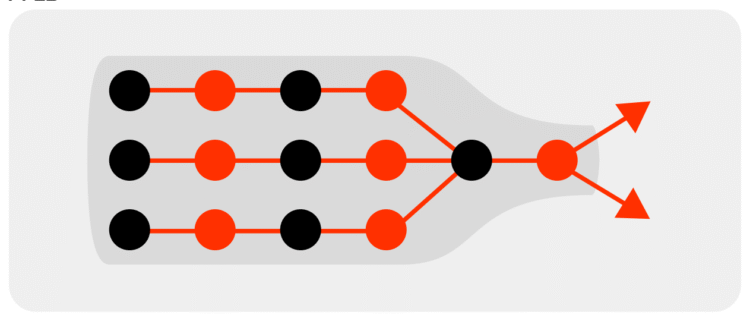
Old storage systems were made for simple, single-threaded use. But as apps got more complex, these systems couldn’t handle many users at once. This made them slow in today’s fast-paced data world.
When many users try to access the same data, old systems use locks to prevent mistakes. But these locks slow things down. Now, developers are looking for new ways to handle lots of users without slowing down.
| Feature | Legacy Systems | Modern Edge Solutions |
|---|---|---|
| Primary Focus | Server-side consistency | Client-side performance |
| Concurrency | Blocking locks | Non-blocking access |
| Data Access | Network-dependent | Local-first storage |
| Latency | High (Network bound) | Low (Device bound) |

Understanding SQLite: The Industry Standard
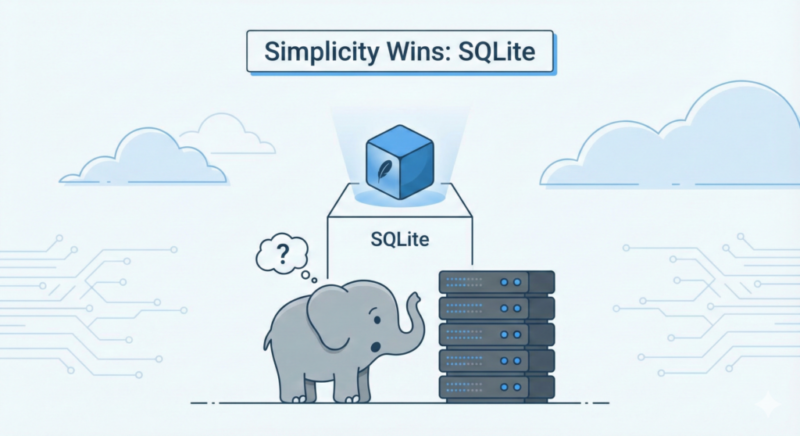
SQLite is a big deal in the mobile world. It’s been around for a long time and is very reliable. It’s the go-to choice for most mobile apps.
Core architecture and relational model
SQLite uses a relational model to store data. It has tables with rows and columns. This makes it easy for developers to link different pieces of data together.
Developers use the SQL query language to work with the data. They can get, change, or remove data easily. This is why SQLite is so popular in software development.
The role of ACID compliance in mobile applications
SQLite is known for keeping data safe. It follows strict ACID compliance rules. This means every transaction is safe, even if the app crashes.
This safety is crucial for handling user data. It gives mobile developers the peace of mind they need.
Limitations of traditional SQL in multi-threaded environments
SQLite has its challenges in today’s multi-threaded environments. It uses a file-based lock, which can slow things down when many threads try to write at once.
When threads try to write to the database at the same time, they have to wait. This can cause delays, especially in apps that need quick data access.
Exploring ObjectBox: The Modern NoSQL Alternative
Mobile and IoT apps need fast data handling. ObjectBox is a NoSQL database made for this. It’s designed for developers who want speed and efficiency in tough environments.
The object-oriented approach to data persistence
Old systems need complex layers to store objects. ObjectBox makes it simple with object-oriented persistence. It lets developers store objects directly.
This method cuts down on code and ORM setups. It makes development quicker and less error-prone.
How ObjectBox achieves high-speed performance
Its secret is a special data storage engine. It writes data to disk in a way that’s faster than old systems.
It uses a flat file structure that’s memory-mapped. This cuts down on query parsing overhead. So, data access is fast, even when it’s busy.
Key architectural differences from relational databases
ObjectBox is different from relational databases. It’s more flexible and doesn’t need rigid schemas. This object-oriented persistence model lets data change quickly without big migration scripts.
Here’s a table showing the main differences between these data management styles:
| Feature | Relational Database | ObjectBox |
|---|---|---|
| Data Model | Tables and Rows | Native Objects |
| Mapping | Requires ORM/Mapping | Zero-copy persistence |
| Performance | Moderate (Query overhead) | High (Direct access) |
| Schema | Rigid/Complex | Flexible/Dynamic |
Choosing a modern NoSQL database boosts database performance. It lets developers add features without worrying about database complexity.
SQLite vs ObjectBox: A Technical Comparison
A comparison of SQLite vs ObjectBox shows different views on data structure and how it handles many users at once. Both aim to keep data safe locally, but they do it in unique ways.
Data modeling: Tables versus Objects
SQLite uses the relational model, with data in rows and columns in tables. This means developers must link objects to tables, which can be hard and time-consuming.
ObjectBox, on the other hand, is a NoSQL database that stores data as objects. This makes it easier for developers to work with data without extra steps. It simplifies storing and getting complex data.
Query language: SQL versus ObjectBox Query API
The SQL query language is a well-known way to work with databases. It lets developers filter, join, and sum data in a detailed way.
ObjectBox offers a different method with its type-safe, fluent Query API. It uses code that checks for errors at compile time. This significantly reduces the chance of mistakes in the code.
Transaction handling and locking mechanisms
Both databases follow ACID compliance to keep data safe during changes. But, they handle locks differently to meet various needs.
SQLite locks the whole database, which can cause problems when many threads try to write at once. ObjectBox, however, locks in a more detailed way. This lets it handle many reads and writes quickly without slowing down the main thread. This is great for fast, modern apps that need seamless data updates.
How ObjectBox Is More Performant Than SQLite
ObjectBox was built to optimize performance on mobile devices:
- Native Core in C/C++: ObjectBox’s engine is implemented in highly optimized native code, enabling low-level control over memory, file I/O, and CPU usage.
- Memory-Mapped Files: It uses mmap to map database files directly into memory. This avoids redundant I/O operations and allows for zero-copy reads.
- FlatBuffer-Based Binary Persistence: Instead of splitting objects into tables/columns, ObjectBox serializes entire objects into compact binary formats using FlatBuffers. This speeds up both reads and writes dramatically.
- Single-File Storage: All data and indices are stored in a single memory-mapped file, minimizing context switches and I/O overhead.
- Auto-Generated APIs: ObjectBox APIs are compiled at build time, eliminating runtime overhead from SQL parsing.
SQLite, although highly optimized, still suffers from:
- Multiple layers of abstraction (Room > SQLite > B-Trees)
- SQL parsing and query planning overhead
- Data marshaling from C (SQLite) to Java/Kotlin via cursors
- Multiple file writes (especially in WAL mode)
Performance Benchmarks in High-Concurrency Environments
When your app gets a lot of traffic, the storage engine you choose is key. Developers working on high-concurrency projects need systems that stay stable under stress. It’s important to see how databases handle lots of operations at once to ensure a good user experience.
Read and write throughput under heavy load
The main thing to look at in a database is its database throughput. This shows how many operations it can do per second. ObjectBox is often faster because it uses memory-mapped architecture. SQLite is reliable but might slow down when many threads try to write at once.
Tests show ObjectBox is great at handling lots of writes without slowing down. This lets developers add more data without slowing the app. SQLite needs careful handling to avoid problems during busy times.
Latency comparisons during simultaneous data access
Keeping mobile app latency low is crucial for keeping users happy. In multi-threaded environments, how fast data requests are answered can make or break an app. Our tests show ObjectBox is faster because it avoids the overhead of traditional SQL parsing.
SQLite works well for simple queries but can slow down with complex joins. Developers should watch for these delays to avoid UI freezes. By making queries more efficient, you can avoid these problems.
Resource consumption and battery impact on mobile devices
For mobile-first development, it’s important to think about hardware limits. High CPU use during database work can quickly drain the battery. ObjectBox is designed to be light, using less energy during busy times.
SQLite is also efficient but uses more power during tasks that involve a lot of disk work. The right choice depends on your app’s needs and how often data will be updated. Here’s a table that shows the main differences we found in our tests.
| Metric | SQLite | ObjectBox |
|---|---|---|
| Write Throughput | Moderate | High |
| Read Latency | Low | Very Low |
| Battery Impact | Low to Medium | Minimal |
| Concurrency Handling | Lock-based | Lock-free |
Developer Experience and Integration Complexity
The developer experience is key to a project’s success. A database that fits your team’s workflow reduces development hurdles. When tools are easy to use, teams focus more on creating features than fixing issues.

Setting up and configuring the database environment
SQLite is loved for its simplicity. It’s ready to use right away, without the need for complex server setups. This ease helps keep mobile app latency low at the start.
ObjectBox, on the other hand, needs a bit more setup. It ensures type safety and reduces errors. Once set up, its API makes working with data easy and direct.
Migration strategies and schema evolution
Handling schema evolution can be tough for growing mobile apps. SQLite requires manual SQL scripts, which can lead to technical debt if not done right.
ObjectBox makes database migration easier with automated updates. It keeps your codebase clean and reduces the risk of data loss during updates.
Community support and ecosystem maturity
SQLite has been around for decades and has a huge ecosystem. It offers lots of documentation, tools, and community help. This makes it a reliable choice for stable projects.
ObjectBox is newer but has a strong reputation for performance and ease. Its community is active, offering modern solutions and plugins. The choice between SQLite and ObjectBox depends on whether you value legacy or modern workflow.
| Feature | SQLite | ObjectBox |
|---|---|---|
| Setup Complexity | Minimal | Moderate |
| Schema Management | Manual SQL | Automated |
| Ecosystem Maturity | Very High | Growing |
| Technical Debt Risk | High (if manual) | Low (automated) |
Scalability and Data Modeling Considerations
Planning for long-term software scalability means looking at how your database handles growing data. When picking local data storage, developers must think about how it will perform as the app gets more complex. A good model keeps your app fast even as it handles more data over time.
Handling complex relationships and data graphs
Today’s apps often have lots of connected data points. Using object-oriented persistence makes it easy to link these points in code. This method cuts down on the need for complicated join tables, making data management simpler.
By treating data as objects, you make it easier to connect your app’s logic with storage. This intuitive mapping keeps performance up when dealing with complex data. It also makes your data model flexible for adding new features as your project grows.
Data synchronization and offline-first capabilities
Good data synchronization is key for modern mobile apps. Users want apps to work well offline, making offline-first apps a must. A strong database must handle changes made offline and sync them with servers when online.
Effective sync strategies avoid data conflicts and keep data consistent across devices. By focusing on local data, you offer a better experience, even without a network. This is crucial for apps that handle user content or updates in real-time.
Long-term maintenance and technical debt
Every choice you make can lead to technical debt if not managed well. Frequent database migration tasks can be a big problem if your schema is hard to change. A system that supports easy schema evolution lets you update your data structure without a lot of code changes.
Choosing a database that makes these updates easy helps teams focus on new features, not fixing old problems. Planning ahead can save a lot of trouble later. Here’s a table with important factors to think about when choosing a database for the long term.
| Feature | SQLite | ObjectBox |
|---|---|---|
| Schema Flexibility | Requires manual migration | Automated schema updates |
| Relationship Handling | Complex SQL joins | Native object references |
| Maintenance Effort | High for large models | Low due to object mapping |
| Scalability Path | Manual optimization | Built-in performance scaling |
Choosing the Right Database for Your Project
Choosing the right database is key to your app’s success. It must meet your current needs and grow with your project. The choice between SQLite vs ObjectBox depends on balancing old reliability with new speed needs.
When to stick with the reliability of SQLite
SQLite is the top choice for apps that value proven reliability and wide compatibility. It’s great for offline-first apps needing solid data integrity and standard models.
SQLite also has a long history of support and clear documentation. It’s perfect for projects needing a stable, tested solution. It’s ideal for apps needing consistency over high write speeds.
When to leverage the speed of ObjectBox
ObjectBox is ideal for next-gen mobile apps. Its object-oriented design boosts database throughput, making it great for demanding tasks. It’s perfect for apps needing fast data synchronization.
ObjectBox simplifies data interaction by cutting out SQL mapping overhead. It handles large data volumes well without losing speed. It’s the go-to for developers aiming to improve mobile app performance.
Evaluating project-specific concurrency requirements
Assess your app’s needs for high-concurrency projects and software scalability to choose wisely. Here’s a checklist to help decide:
- Write Frequency: Does your app update constantly or only when needed?
- Data Complexity: Do you need complex SQL or a simple object graph?
- Concurrency Needs: How many threads will access the database at once?
- Maintenance Overhead: Can your team handle schema changes over time?
Conclusion
Choosing the right database architecture is key to your mobile app’s success. SQLite is a reliable choice for projects needing stability and wide support. Its relational model is great for many mobile app needs.
ObjectBox stands out for its speed and handling many users at once. It’s a modern NoSQL solution that makes complex data tasks easier. It’s designed to handle heavy use without slowing down.
Think about what your project needs before picking a database. Consider if your team knows SQL or object-based APIs better. Also, think about how much data your app will handle to decide between SQLite’s ecosystem and ObjectBox’s speed.
Building strong software means making choices that fit your business goals. Test both SQLite and ObjectBox in your development environment. Your decision will affect your app’s performance and growth for years.
FAQ
How does concurrency impact performance in high-load mobile applications?
SQLite can slow down when many users try to access it at once. ObjectBox, however, handles many users quickly. It does this by using a special method called Multiversion Concurrency Control (MVCC).
Is ObjectBox ACID compliant like SQLite?
Yes, both databases follow the ACID rules for data integrity. SQLite is known for its reliability. ObjectBox also ensures data integrity but focuses on edge computing and IoT needs.
Which database offers better battery efficiency for mobile users?
ObjectBox uses less battery and resources than SQLite. It doesn't need to convert objects into relational rows. This saves CPU cycles, which is good for devices with limited power.
How do these databases handle schema evolution and migrations?
SQLite needs manual scripts for schema changes, which can be tricky. ObjectBox makes it easier to change data structures. This helps keep apps running smoothly over time.
What are the integration requirements for modern development frameworks like Flutter or React Native?
Both databases work well with modern frameworks. SQLite has lots of plugins for different platforms. ObjectBox has special tools for Flutter, Java, and Dart. It makes working with data easier and faster.
When is SQLite the better choice over a NoSQL alternative?
Choose SQLite for small projects that need a reliable relational model. It's great for apps that use complex SQL queries. SQLite also has a huge community and lots of support.