Table of Contents
Anyone shopping for Help Desk Software for SMBs quickly runs into the same frustrating pattern: vendor pricing pages advertise a clean “starting at $X per agent” figure, but they almost never disclose the mandatory add-ons, marketplace plugins, implementation fees, or the uncomfortable moment — usually six months in — when a critical feature turns out to live two tiers above the plan that was purchased.
After more than a decade of deploying platforms like Zendesk, Freshdesk, Zoho Desk, ServiceDesk Plus, Jira Service Management, and various open source alternatives across small and mid-sized businesses, seasoned consultants tend to converge on one uncomfortable truth: there is no universally “best” help desk. There is only the platform that best matches a specific organization’s ticket volume, process maturity (ITIL, ITSM, ESM), and tolerance for technical administration.
This guide is designed as the article most buyers wish they had read before signing their first annual contract: a transparent comparison with verified pricing, honest pros and cons, free and open source options, and the nuance that only emerges after the tenth production migration.
What a Help Desk Software Actually Is (and What It Isn’t)
Before any meaningful comparison, vocabulary alignment matters — and this is where many buyers go wrong.
A help desk software is a platform designed to centralize, prioritize, route, and resolve support requests. Those requests can come from external customers (Customer Support) or internal employees through an IT help desk, a human resources ticketing system, facilities, or finance teams. At its core, every help desk revolves around a ticketing engine that drives a lifecycle: creation, triage, assignment, resolution, and closure.
A help desk, however, is not the same as a full ITSM (IT Service Management) platform. The practical difference:
- A traditional help desk focuses on incident and request management.
- An ITSM platform layers in formal processes aligned with frameworks like ITIL 4 or ISO/IEC 20000: problem management, change management, configuration management (CMDB), service portfolio, and release management.
- An ESM (Enterprise Service Management) platform extends ITSM processes to non-IT departments, which is exactly what powers the modern human resources ticketing system category.
This distinction matters because it directly drives cost. A team that only needs to manage support requests but ends up paying for a full ITSM suite is essentially buying a freight truck to do grocery runs.
The Truth About Pricing: What Really Drives the Bill
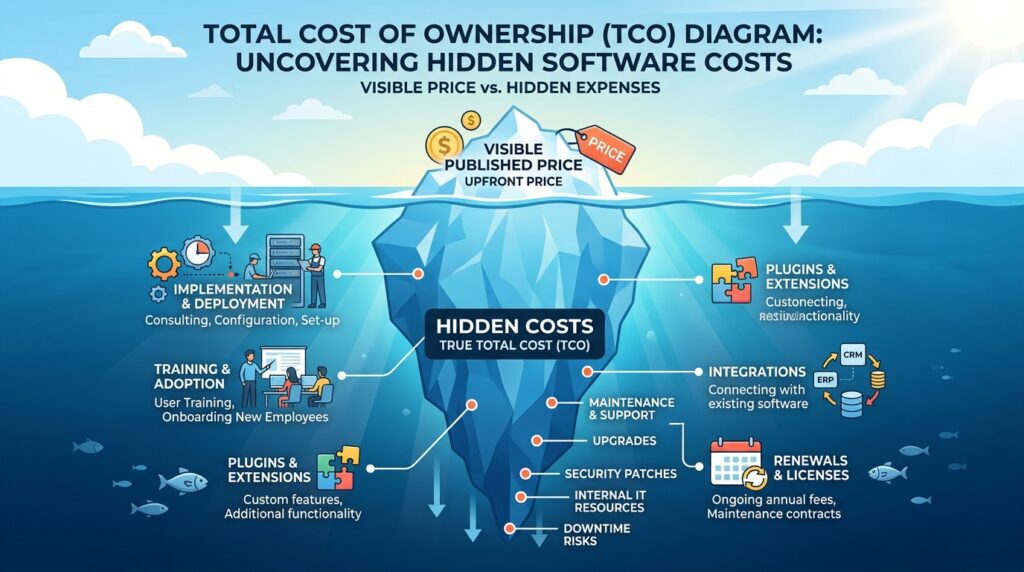
Years of implementation work reveal that the published price is just the opening line of a much longer financial conversation. Real costs are built across five layers:
- Base licensing per agent or technician — the only number visible on the pricing page.
- Mandatory add-ons — telephony, AI, asset management, live chat, additional ITIL modules.
- Marketplace apps or plugins — particularly relevant for Atlassian, where the community refers to plugin spend as the “Atlassian Tax.”
- Implementation and professional services — the more complex the platform, the more expensive the partner.
- Renewals and annual price increases — many contracts include automatic escalation clauses.
A reliable way to model real Total Cost of Ownership (TCO) is to consult independent analyst reports such as the Gartner Magic Quadrant for IT Service Management Platforms, plus verified user reviews on G2, Capterra, and TrustRadius — sources that consistently show the gap between list price and actual paid price.
Master Comparison Table: Help Desk Platforms for SMBs at a Glance
The table below summarizes the platforms covered in this analysis. All pricing is verified from public sources as of early 2026, but readers should always confirm directly with vendors before purchase.
| Platform | Best For | Free Plan | Starting Paid Price (Annual Billing) | Deployment | Ideal Team Size |
|---|---|---|---|---|---|
| Zoho Desk | Customer support with budget constraints | Yes — 3 agents | ~$7 / agent / month (Express) | Cloud | 1–100+ agents |
| Freshdesk | Fast adoption customer support | Yes — 2 agents (limited) | ~$15–19 / agent / month (Growth) | Cloud | 5–100+ agents |
| Zendesk Suite | Enterprise-grade omnichannel CX | Trial only | ~$55 / agent / month (Suite Team) | Cloud | 20+ agents |
| Jira Service Management | Technical / DevOps-aligned ITSM | Yes — 3 agents | ~$20 / agent / month (Standard) | Cloud / Data Center | 3–20,000 agents |
| ManageEngine ServiceDesk Plus | ITIL-aligned IT service management | Free Standard for up to 5 techs | ~$13–16 / technician / month | Cloud / On-Premise | 5–500+ technicians |
| Spiceworks Help Desk | Free internal IT ticketing | Fully free (ad-supported) | $0 | Cloud | 1–10 IT pros |
| osTicket | Self-hosted open source ticketing | Free (self-hosted) | $0 (hosting cost only) | Self-hosted | Variable |
| GLPI | Open source ITSM + asset management | Free (self-hosted) | $0 (hosting cost only) | Self-hosted | Variable |
This table provides the high-level landscape. The sections below dive into each platform’s pricing structure, real-world strengths, and operational trade-offs.
Detailed Platform Analysis
1. Zoho Desk — The Price-to-Functionality Sweet Spot
Zoho Desk has earned its reputation as one of the strongest best customer support ticketing system options for SMBs because it delivers near-enterprise capabilities at prices small teams can absorb.
Zoho Desk Pricing Tiers (verified against the official Zoho pricing page):
| Plan | Annual Price (per user/month) | Key Capabilities |
|---|---|---|
| Free | $0 (up to 3 agents) | Email ticketing, Help Center, basic ticket management |
| Express | ~$7 (5-agent minimum) | Workflow rules, dashboards, social media (1 channel) |
| Standard | ~$14 | Live chat (1 channel), SLAs with escalation, unlimited agents |
| Professional | ~$23 | Multi-department, blueprints, sub-tickets, time tracking |
| Enterprise | ~$40 | Zia AI, multi-brand, advanced customization, 50 light agents included |
Field experience notes: The real strength of Zoho Desk is the broader Zoho ecosystem. Organizations already running Zoho CRM, Zoho Books, or Zoho People benefit from near plug-and-play integration. The notable caveat is that telephony requires a separate Zoho Voice subscription, which breaks the “all-in-one” illusion that the marketing implies. Configuration of Blueprints (workflow automation) is also where most teams spend the bulk of their setup time.
Pros:
- A genuine free plan (not a trial) supporting up to 3 agents.
- Strong price-to-feature ratio at the Standard tier.
- Deep native integration across the Zoho stack.
Cons:
- Telephony, WhatsApp, and SMS require paid add-ons.
- Interface can feel dense to new users.
- Several advanced reporting capabilities are gated to Enterprise.
2. Freshdesk (Freshworks) — The Customer Support Team’s Favorite
Freshdesk is one of the most frequently recommended platforms for customer-facing SMB support teams. The reason is simple: adoption velocity is among the fastest in the market.
Freshdesk Pricing Tiers (verified against the official Freshworks pricing page):
| Plan | Annual Price (per agent/month) | Key Capabilities |
|---|---|---|
| Free | $0 (up to 2 agents) | Ticketing, knowledge base, basic reporting |
| Growth | ~$15–19 | SLAs, automation, agent collision detection, prebuilt reports |
| Pro | ~$49–55 | CSAT surveys, round-robin routing, custom roles, multilingual support |
| Enterprise | ~$79–89 | Skill-based routing, audit logs, sandbox, IP allowlisting |
In addition, Freshdesk Omni is a separately priced product that delivers true omnichannel (chat, voice, messaging) in a unified inbox, with its own tier structure.
Field experience notes: The jump from Growth to Pro is where many SMBs get stuck. Capabilities that most teams assume are essential — round-robin routing, CSAT surveys, custom roles — live in Pro, not Growth. Teams that anticipate growth should budget for Pro from day one. Freddy AI is the second budget consideration: most AI capabilities (Copilot, AI Agent) sit outside the base plan as per-agent add-ons.
Pros:
- Modern, intuitive interface with minimal learning curve.
- The free plan is genuinely useful for micro teams.
- Visual reporting is strong starting at Growth.
Cons:
- AI features (Freddy AI Copilot, Freddy AI Agent) cost extra.
- Telephony via Freshcaller adds per-minute charges.
- Renewal price increases are frequently flagged in G2 reviews.
3. Zendesk Suite — The Enterprise Standard That Reached SMBs
Zendesk remains the industry reference, but its pricing model is honestly the most complex in this comparison. It operates under two main suites — Customer Service Suite and Employee Service Suite — each with Team, Growth, Professional, and Enterprise tiers.
Zendesk Suite Pricing Tiers (Customer Service Suite, official pricing):
| Plan | Annual Price (per agent/month) | Key Capabilities |
|---|---|---|
| Suite Team | ~$55 | Multichannel ticketing, basic Help Center, prebuilt analytics |
| Suite Growth | ~$89 | Self-service portal, SLAs, multilingual support |
| Suite Professional | ~$115 | HIPAA compliance, advanced analytics, skills-based routing |
| Suite Enterprise | ~$169 | Custom roles, sandbox, advanced AI options |
Critical add-ons layered on top: Advanced AI, Copilot, Workforce Management (WFM), Quality Assurance (QA) — each priced per agent per month.
Field experience notes: Zendesk is the platform that has historically suffered from the “growth trap.” Companies starting on Suite Team often end up two years later on Suite Professional plus Copilot plus WFM, multiplying the original cost. The ideal Zendesk customer is typically a business with a mature support function, established compliance requirements (HIPAA, GDPR, SOC 2), and budget headroom. For very small SMBs, Zendesk often represents over-engineering relative to actual operational needs.
Pros:
- Extremely mature, battle-tested platform.
- Marketplace with thousands of integrations.
- Strong fit for compliance-heavy industries.
Cons:
- Add-ons routinely push real cost well above list price.
- Implementation timelines run into weeks or months.
- Some users describe the interface as feeling dated in 2026.
4. Jira Service Management (Atlassian) — The Technical Team’s ITSM
For organizations already living inside the Atlassian ecosystem (Jira Software, Confluence, Bitbucket), Jira Service Management (JSM) is almost the default choice. Buyers coming from outside Atlassian, however, should understand that JSM is a full ITSM platform — not a lightweight help desk.
Jira Service Management Pricing Tiers (verified against the official Atlassian pricing page):
| Plan | Annual Price (per agent/month) | Key Capabilities |
|---|---|---|
| Free | $0 (up to 3 agents) | ITSM templates, 2 GB storage, alerts, on-call schedules |
| Standard | ~$20 | Up to 20,000 agents, audit logs, data residency |
| Premium | ~$48–51 | Asset & configuration management, Atlassian Intelligence AI, virtual service agent, 99.9% uptime SLA |
| Enterprise | Custom pricing | Multi-site, advanced identity management, 24/7 support |
Field experience notes: The Standard plan is deceptively attractive. Several critical ITSM functions — CMDB, advanced change management, deep problem management — live in Premium. This is where the “Atlassian Tax” enters the picture: most teams end up purchasing Atlassian Marketplace plugins (timeline views, time tracking, advanced reporting) that are typically billed by total instance users, not just plugin users. Three plugins on a mid-sized instance can quietly add a substantial monthly line item to the invoice. Additionally, Jira Service Management is distinct from Jira Software and Jira Work Management, and they each have separate pricing pages — a common point of confusion during early evaluation.
Pros:
- Native integration with Jira Software, ideal for DevOps and SRE teams.
- The Free plan is genuinely useful for small technical teams.
- Workflows are extremely flexible.
Cons:
- Steep learning curve for non-technical users.
- Marketplace plugin costs frequently surprise buyers.
- Full ITIL implementation can stretch over several months.
5. ManageEngine ServiceDesk Plus — The ITSM Veteran with SMB Reach
ServiceDesk Plus, part of ManageEngine (a division of Zoho Corporation), is one of the most complete ITSM platforms available, and its cloud edition has substantially lowered the entry barrier for SMBs. The search term servicedesk plus cloud pricing is among the most common in the ITSM space precisely because the licensing model is unusually flexible.
ServiceDesk Plus Cloud Pricing Tiers (per ManageEngine’s official pricing):
| Plan | Annual Price (per technician/month) | Key Capabilities |
|---|---|---|
| Standard | ~$13–16 | Incident management, knowledge base, self-service portal |
| Professional | ~$27–33 | Adds IT Asset Management (ITAM), purchase & contract management |
| Enterprise | ~$67–78 | Full ITIL suite: change, release, project management, CMDB, service catalog |
Key licensing model: ServiceDesk Plus charges per technician (not per end user), and the employees submitting tickets are unlimited. This makes it particularly attractive for SMBs with large employee bases but small IT teams.
Field experience notes: ServiceDesk Plus is where ITIL discipline genuinely shows. The product is PinkVERIFY-certified for multiple ITIL processes — a recognized industry quality mark. The on-premise edition remains popular in regulated sectors (government, healthcare, finance) where full data control is mandatory. The interface, however, is not the most modern; users frequently describe it as “functional but dated.” Live chat is also always a separate add-on, regardless of edition.
Pros:
- Per-technician licensing model favors SMBs with small IT teams.
- PinkVERIFY certification for ITIL processes.
- Free Standard edition for small technician groups.
Cons:
- Live chat is an add-on across all editions.
- Interface is less polished than newer competitors.
- Initial configuration requires technical knowledge.
6. Spiceworks Help Desk — The Free Classic That Still Has a Place
Spiceworks Help Desk is the elder statesman of free IT help desks. It continues to serve small organizations with very small IT teams that need to bring order to email and messaging chaos without spending a dollar.
Model: completely free, monetized through advertising and IT vendor promotions inside the platform. Available as a cloud product.
Field experience notes: Spiceworks works well as a way to validate whether a structured help desk is genuinely needed before any spending commitment. The natural ceiling tends to arrive when a team needs robust SLAs, complex automation, or advanced reporting — at which point a paid platform becomes the better path. Another consideration: the in-platform advertising can be a sensitive issue for organizations that prioritize a clean corporate environment.
Pros:
- Genuinely free, with no hidden license fees.
- Active community of IT professionals.
- Relatively quick setup for small teams.
Cons:
- Embedded advertising inside the platform.
- Limited functionality compared to paid alternatives.
- Basic reporting and automation.
Free Helpdesk Solutions and Open Source Options: When “Free” Genuinely Makes Sense
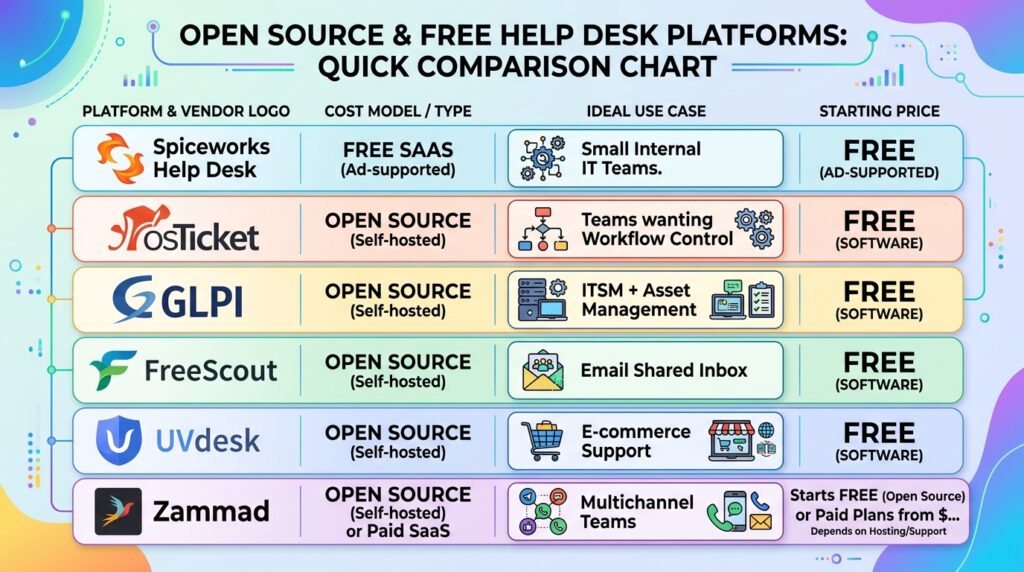
Search demand for free helpdesk solutions, free IT help desk software, and free ticketing service continues to grow year over year — and for good reason. For many small teams, open source alternatives are entirely viable when chosen correctly.
The table below summarizes the most credible free and open source options, including platforms that consistently appear in real-world deployments.
| Solution | Type | Hosting Model | Best Use Case | Notable Limitation |
|---|---|---|---|---|
| Spiceworks Help Desk | Free SaaS (ad-supported) | Vendor cloud | Small internal IT teams | In-platform advertising |
| osTicket | Open source | Self-hosted | Teams wanting workflow control | Aging interface |
| GLPI | Open source | Self-hosted | ITSM + asset management | Setup complexity |
| FreeScout | Open source | Self-hosted | Email shared inbox | Limited multichannel |
| UVdesk | Open source | Self-hosted | E-commerce support | Smaller community |
| Zammad | Open source | Self-hosted or paid SaaS | Multichannel teams | Ruby stack maintenance |
A short profile of each:
osTicket remains the most mature open source ticketing system. Built in PHP with an active community and solid documentation, it covers ticketing, knowledge base, SLAs, and deep workflow customization. The trade-off is that the deploying organization absorbs the cost of hosting, maintenance, security patches, and backups. The interface is functional but visibly less polished than SaaS alternatives.
GLPI is a French open source platform that has become a reference in Europe, particularly across public sector and education. It delivers help desk, asset management, and even ITIL capabilities. Customization potential is enormous, but it requires significant technical investment to extract full value.
FreeScout is a self-hosted, open source platform with an interface inspired by Help Scout. It is ideal for email-driven support teams that want a shared inbox without recurring SaaS fees.
UVdesk is open source with modules particularly strong on e-commerce integrations (Shopify, Magento, WooCommerce). It’s a solid option for online stores managing order- and return-related tickets.
Zammad is a more modern open source platform built on Ruby on Rails, with a clean interface and multichannel support (email, chat, social). It has gained particular traction across European businesses.
The uncomfortable truth about “free”: Real-world experience deploying these platforms makes one thing clear: free does not mean cost-free. The actual TCO of an open source deployment includes:
- Hosting (VPS or cloud infrastructure).
- Administrator time for patches, backups, and updates.
- Team learning curve.
- Opportunity cost when the platform fails at a critical moment without official support.
A reasonable rule of thumb: organizations with sysadmin capacity in-house and very small support teams can save meaningful money each year with open source. Organizations without that capacity are usually better served by the free tier or entry tier of a SaaS platform.
Help Desk vs. Ticketing System for Small Business: Choosing the Right Category
Many small businesses search specifically for a ticketing system for small business rather than a full help desk. The distinction is real and worth clarifying:
- A ticketing system is the narrowest tool — it captures, tracks, and closes work items.
- A help desk layers customer-facing capabilities around ticketing: knowledge base, multichannel intake, SLAs, automation, and reporting.
- A service desk (an ITSM concept) extends the help desk with formal ITIL-aligned processes.
For a small business that primarily needs to track customer emails or employee requests in a structured way, a lightweight ticketing system — or even the free tier of Zoho Desk, Freshdesk, or osTicket — is usually sufficient. Adopting a full ITSM platform like ServiceDesk Plus or Jira Service Management at this stage is typically premature and adds unnecessary complexity. The right time to upgrade is when ticket volume, SLA pressure, or compliance requirements start exceeding what a basic ticketing system can handle.
Feature Comparison: Where Each Platform Wins
The table below highlights how the leading platforms compare across the capabilities that most influence SMB buying decisions.
| Capability | Zoho Desk | Freshdesk | Zendesk | JSM | ServiceDesk Plus | Spiceworks |
|---|---|---|---|---|---|---|
| Free Plan | ✅ 3 agents | ✅ 2 agents (limited) | ❌ Trial only | ✅ 3 agents | ✅ 5 techs | ✅ Unlimited |
| Email Ticketing | ✅ | ✅ | ✅ | ✅ | ✅ | ✅ |
| Live Chat (Native) | ⚠️ Standard+ | ⚠️ Add-on | ✅ Suite plans | ⚠️ Limited | ❌ Add-on | ❌ |
| AI / Automation | ⚠️ Enterprise (Zia) | ⚠️ Add-on (Freddy) | ⚠️ Add-on (Copilot) | ✅ Premium+ | ⚠️ Add-on | ❌ |
| Asset Management | ❌ | ❌ (Freshservice) | ❌ | ✅ Premium+ | ✅ Professional+ | ✅ Basic |
| ITIL Processes | ❌ | ❌ (Freshservice) | ⚠️ Limited | ✅ Premium+ | ✅ Enterprise | ❌ |
| Knowledge Base | ✅ | ✅ | ✅ | ✅ | ✅ | ⚠️ Basic |
| SLA Management | ⚠️ Standard+ | ⚠️ Growth+ | ⚠️ Growth+ | ✅ Standard+ | ✅ All editions | ⚠️ Basic |
| Multi-Department / ESM | ⚠️ Professional+ | ⚠️ Add-on | ✅ Employee Suite | ✅ Premium+ | ✅ Enterprise | ❌ |
| Public API | ✅ | ✅ | ✅ | ✅ | ✅ | ⚠️ Limited |
Legend: ✅ Native and broadly available · ⚠️ Available with restrictions or in higher tiers · ❌ Not available
This comparison highlights why platform selection should be tied to specific operational needs rather than brand reputation. A team that needs strong asset management, for example, should immediately filter out Zoho Desk and Freshdesk core in favor of ServiceDesk Plus, JSM Premium, or Freshservice (Freshworks’ separate ITSM product).
Expert Insights: What Years of Implementations Actually Teach
The following observations rarely appear in generic comparison articles, but they consistently make the difference between a successful deployment and a painful one.
Insight #1: The Most Common Mistake Isn’t Picking the Wrong Tool — It’s Underestimating Migration
Many organizations deploy Zendesk flawlessly but never properly migrate historical tickets, macros, and automations from the previous system. The result is two systems running in parallel for months. Before signing any contract, buyers should demand a written migration plan with timelines, named owners, and clear data validation criteria.
Insight #2: Agent Count Drives Cost More Than Plan Selection
Nearly every help desk charges per agent per month. This means that license strategy matters more than plan selection. Practical tactics that experienced teams use include:
- Light agents (Zoho Desk Enterprise includes them by default; JSM has equivalent roles): perfect for supervisors, managers, or stakeholders who only need read access to tickets.
- Day passes (offered by Freshdesk): ideal for occasional users.
- Concurrent licensing (Vivantio): excellent for teams that work in rotating shifts.
Insight #3: SLAs Are Not a Feature — They Are an Operational Commitment
Configuring SLAs in any platform is trivial. Meeting them consistently requires discipline in triage, escalation matrices, and reporting. Before fixating on which platform has “better SLA management,” organizations should define First Response Time (FRT) and Time to Resolution (TTR) targets per ticket category. Frameworks like ITIL 4 and the ISO/IEC 20000 standard offer solid guidance for this work.
Insight #4: Using a Help Desk as a Human Resources Ticketing System Requires Day-One Planning
Adoption of help desk platforms as a human resources ticketing system is growing rapidly. The requirements, however, are different: sensitive data privacy (PII, medical information), an entirely different ticket category structure (PTO, benefits, workplace conflicts), and stricter approval workflows. Platforms with strong native ESM capabilities — JSM, Freshservice, ServiceDesk Plus, and Zendesk Employee Service Suite — are best suited to this workload. Repurposing a customer support help desk for HR without separating instances or portals is a common and avoidable mistake.
Insight #5: Negotiate the Contract Like Real Estate, Not Software
SaaS list prices are rarely what enterprise customers actually pay. Procurement specialists and platforms like Vendr consistently demonstrate that buyers can negotiate:
- Discounts for annual or multi-year commitments.
- Renewal price increase caps.
- Free or subsidized implementation.
- Included training.
- Additional sandboxes at no extra cost.
A reasonable practice is to obtain at least two competitive quotes before signing.

Decision Framework: Choosing the Right Help Desk for an SMB
Drawing on the analysis above, the following framework helps clarify the final decision:
Priority is external customer support and rapid implementation: → Start with Freshdesk or Zoho Desk. Both offer credible free plans for validation.
Priority is internal IT support with ITSM ambitions: → Evaluate ServiceDesk Plus Cloud (for serious ITIL without excessive complexity) or Jira Service Management (when already in the Atlassian ecosystem).
Priority is the most mature, robust platform with budget headroom: → Zendesk Suite Professional or Enterprise.
Priority is zero budget with available technical capacity: → Spiceworks for IT cloud, or osTicket / GLPI / FreeScout for self-hosted.
Need a separate human resources ticketing system: → Consider Freshservice, JSM, or a separate ServiceDesk Plus instance.
Frequently Asked Questions (FAQ)
1. What is the best free help desk software for a small business?
The answer depends entirely on the use case. For external customer support, the Zoho Desk Free plan (3 agents, no time limit) is arguably the strongest serious free option in the market. For internal IT, Spiceworks Cloud Help Desk remains hard to beat for organizations that can tolerate in-platform advertising. Teams with sysadmin capacity should consider osTicket or FreeScout, which offer full control with no license cost — only the hosting expense. The right question is not “which free tool is best” but “how much team time is the organization willing to invest to avoid licensing fees.”
2. Is ServiceDesk Plus Cloud better than Jira Service Management for an SMB?
Both are full ITSM platforms, but they target different profiles. ServiceDesk Plus Cloud is friendlier for traditional IT teams coming from classical ITIL processes — incident, problem, change, and asset management are well-structured from day one. Jira Service Management shines when the organization already runs Jira Software or Confluence, or when the IT team works closely with DevOps and SRE functions. On cost: ServiceDesk Plus tends to be more predictable (per-technician licensing, unlimited end users), while JSM can inflate quickly due to Atlassian Marketplace plugins. The most reliable evaluation method is to test both on their free or trial tiers and measure how quickly the team can create and resolve a ticket end-to-end.
3. Is it worth paying for SaaS when an open source option offers similar capabilities?
This is the most important cost question. The honest answer: it depends on the real cost of internal technical time. If an IT administrator dedicates several hours per week to maintaining osTicket (patches, backups, debugging, internal support), the organization is “paying” in time, plus the opportunity cost. A commercial SaaS license for the same team often costs less than that calculation when fully accounted for. Open source becomes the right choice when (a) the team is very small, (b) technical capacity is genuinely available, (c) requirements are stable and innovation is not a priority, or (d) data sovereignty is an absolute requirement (regulated sectors, government).
Conclusion: The Decision That Truly Matters
After examining Zoho Desk, Freshdesk, Zendesk, Jira Service Management, ServiceDesk Plus, Spiceworks, and the leading open source options, one thing is clear: the Help Desk Software for SMBs market in 2026 is more mature and more differentiated than ever. The good news is that the right platform exists for nearly every operational profile. The bad news is that no comparison article — including this one — can make the decision for the buyer.
A practical, four-step recommendation distilled from years of implementations:
First, define honestly the ticket volume, agent count, and whether the need is customer support, internal IT support, or both. Second, identify non-negotiable processes (SLAs, multichannel, asset management, ITIL compliance). Third, test at least two platforms on their free or trial tiers using real-world cases — not vendor-prepared demos. Fourth, calculate 24-month TCO including all add-ons, not just per-agent pricing.
The right help desk is not the most expensive, the cheapest, or the most popular. It is the platform that the team will use consistently because it makes their work easier — not because it was imposed on them. After 15 years of helping organizations make this decision, that judgment remains more art than science.
Buyers who take this analysis seriously and apply the framework will avoid the most expensive mistake of all: switching platforms many months later because the right questions were never asked at the start.
This article is based on publicly verified information from official vendor pricing pages (Zoho, Freshworks, Zendesk, Atlassian, ManageEngine, Spiceworks), independent analyst publications (Gartner, Forrester), verified user reviews from G2, Capterra, and TrustRadius, and direct implementation experience. Pricing and plans change frequently; readers should always verify directly with the vendor before any purchase decision.